Where to find Accounting reports
Summary
Find, run and download your SACCO's financial statements from the Accounting Reports screen in CAMS.
About 3 minutes · 6 steps. Also called: financial statements, trial balance, income statement, balance sheet, P&L.
Keep reading — it's free
Sign in with your email to read the rest of this article, track what you have finished, and earn your certificate.
Sign inPrerequisites
- A CAMS sign-in with access to the Accounting menu.
- The date range you want to report on.
Step-by-step
Sign in to CAMS Admin.
In the left menu, expand Accounting and click Reports. You land on Accounting Reports, where every financial report sits as a card. Wait until the cards finish loading.
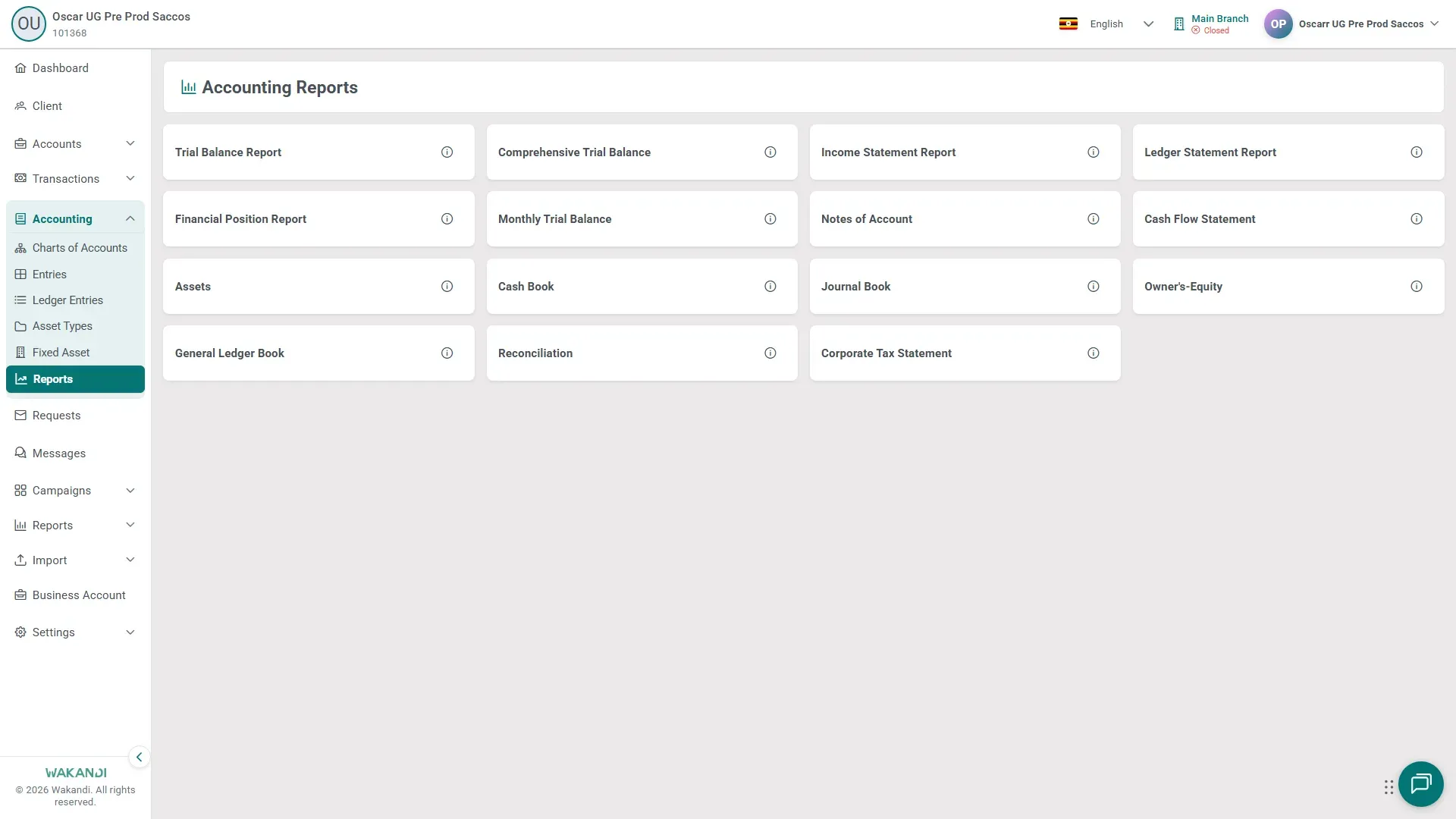
Figure 1: The Accounting Reports screen with its report cards, including Trial Balance Report, Income Statement Report and Financial Position Report
Then, the main things on this screen:
- The trial balances. Trial Balance Report and Comprehensive Trial Balance show opening balances, debit and credit totals and closing balances by account; total debits should equal total credits. Monthly Trial Balance compares the same figures month by month.
- The statements. Income Statement Report is income and expenses for the period (your profit and loss). Financial Position Report is the balance sheet. Cash Flow Statement, Notes of Account, Assets, Owner's-Equity, Corporate Tax Statement and Reconciliation sit alongside them.
- The books. Ledger Statement Report, General Ledger Book, Cash Book and Journal Book hold the entries behind your ledgers. Ledger Statement Report also filters by Posting date, Ledger Account and Entry Type.
- Running one. Click a card and let it finish loading before you touch the filters. Check the period at the top, set the Date Range and any filters, and read the results. Click Download PDF, Download Excel or Download CSV for an offline copy; not every report offers all three. There is no print button, so print the PDF from your viewer.
Tip: On Trial Balance Report or Monthly Trial Balance, click a group to open the Group Ledger Statement: its opening balance, every entry and the closing balance, with View on each row.
Common pitfalls & FAQ
- The report is empty. Widen the date range, then check that ledgers and entries exist for that period. The dates must sit inside the financial year (see Check which financial year is open).
- I don't see Accounting in the left menu. Your role may not have access to it. Ask your administrator.
- I need one member's statement. Open the member's profile and use the Statement tab, or open the separate Reports menu and click Statement. Accounting Reports cover the SACCO's own books.
- Settings buttons are missing on Owner's-Equity or Cash Flow Statement. Switch the branch control to All Branches. The next lesson shows why.
- The downloaded file shows different figures from the screen. Since 6 October 2026, the PDF, Excel and CSV downloads of Trial Balance, Comprehensive Trial Balance, Monthly Trial Balance, Cash Flow Statement and Cash Book use the same calculation as the screen. A file downloaded before then may show different group totals or debit and credit sides, so download it again. If a new download still differs from the screen, contact support with the report name, branch and date range.