How to tune an AML monitoring rule
Summary
Change how sensitive a monitoring rule is, and choose who gets told when it fires. About 6 minutes · 6 steps. Also called: edit a rule, change a threshold, too many alerts.
Sign in with your email to read the rest of this article, track what you have finished, and earn your certificate.
Sign inPrerequisites
- A sign-in for Wakandi AML Risk Monitoring with an administrator role.
- An agreed decision from your compliance officer about the new setting. Changing a rule changes what your institution does and does not detect.
Step-by-step
- Open Wakandi AML Risk Monitoring and sign in.
- In the top menu, click Settings. You'll land on the Rules tab.
- Click the rule you want to change. It opens on its own page.
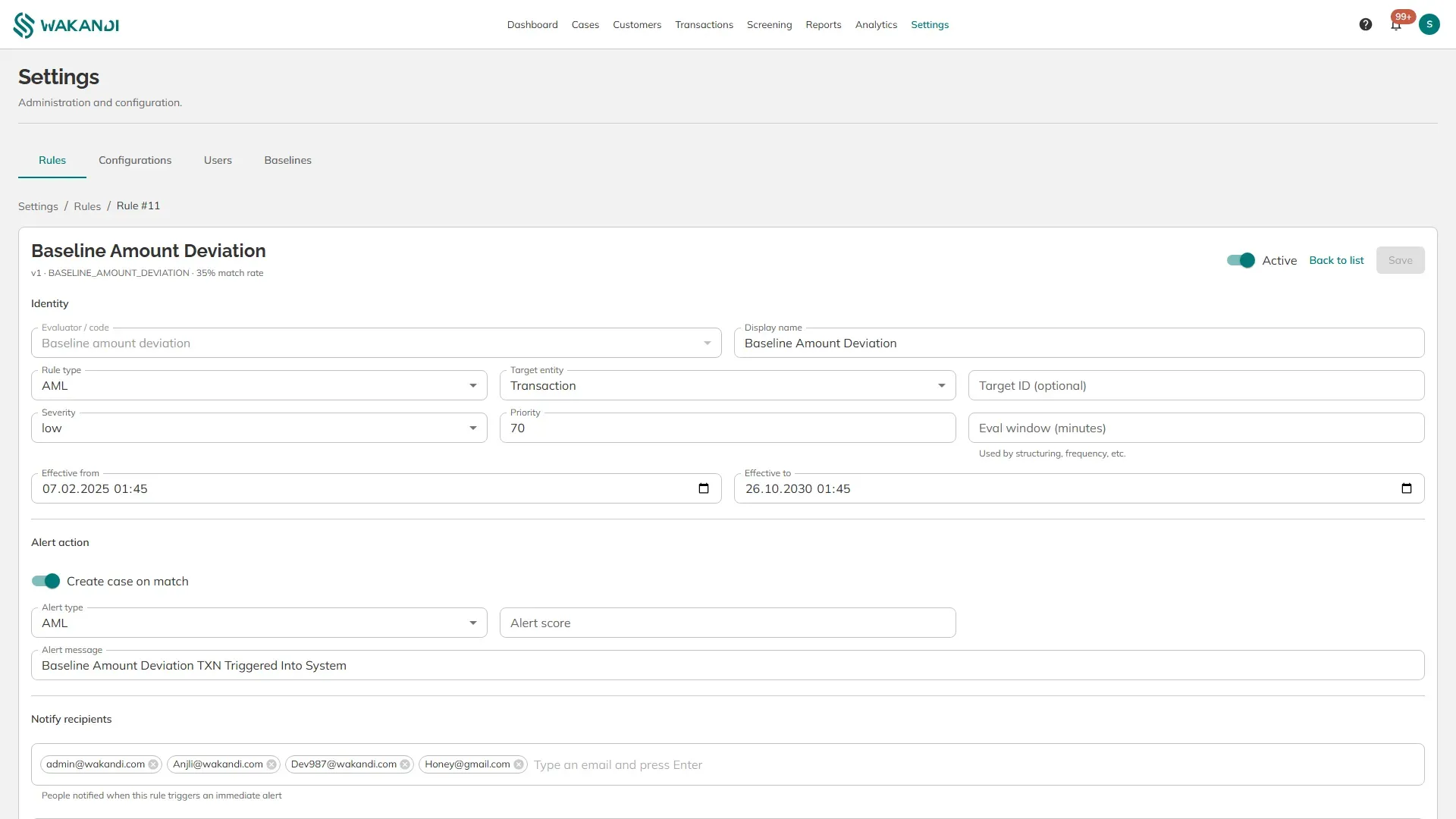
- Adjust the settings under Identity:
- Severity — how urgent its cases look in the queue.
- Priority — which rule is evaluated first when several could match.
- Eval window (minutes) — how far back the rule looks. Structuring and frequency rules use this.
- Effective from and Effective to — dates the rule is live between. Leave empty to run it always.
- Under Alert action, set what happens on a match. Create case on match opens a case. Alert score and Alert message decide the number and the wording that appear on it. Add email addresses and phone numbers under Notify recipients for the people who should be told immediately.
- Click Save.
Effectiveness, at the bottom, is how you check your change afterwards. It shows how many times the rule has been evaluated, how many times it matched, how many were marked false positives, and when it last ran.
Conditions is for custom rules. The eleven built-in rules use their own evaluator and read your Configurations values, so you tune those rules through the settings above rather than by writing conditions.
Warning: Making a rule less sensitive means activity that would have been flagged yesterday will pass unnoticed tomorrow. Agree the change with your compliance officer and note the reason before you save.
Note: Phone numbers under Notify recipients take local digits only. The country code is added from your AML country setting when the message is sent.
Common pitfalls & FAQ
- The rule still fires as often as before. Several built-in rules read their thresholds from Settings, Configurations, not from the rule. Change the value there.
- Nobody received an alert. Check that an address or number is listed under Notify recipients, and that the recipient's user account is active.
- I want to stop a rule completely. Switch it off with the Active control rather than deleting it, so its history stays readable.
- False positives shows 0. That count comes from cases officers dismiss. It stays at zero until people start recording their decisions.