The eleven AML monitoring rules
Summary
The eleven monitoring rules in Wakandi AML Risk Monitoring, and the behaviour each one looks for.
About 2 minutes · 3 steps. Also called: AML rules, detection rules, what gets flagged.
Sign in with your email to read the rest of this article, track what you have finished, and earn your certificate.
Sign inPrerequisites
- A sign-in for Wakandi AML Risk Monitoring. Any role can read the rules; changing them needs an administrator.
Step-by-step
Open Wakandi AML Risk Monitoring and sign in.
In the top menu, click Settings. You'll land on the Rules tab.
Read the list. Match % on the right tells you how often each rule has fired.
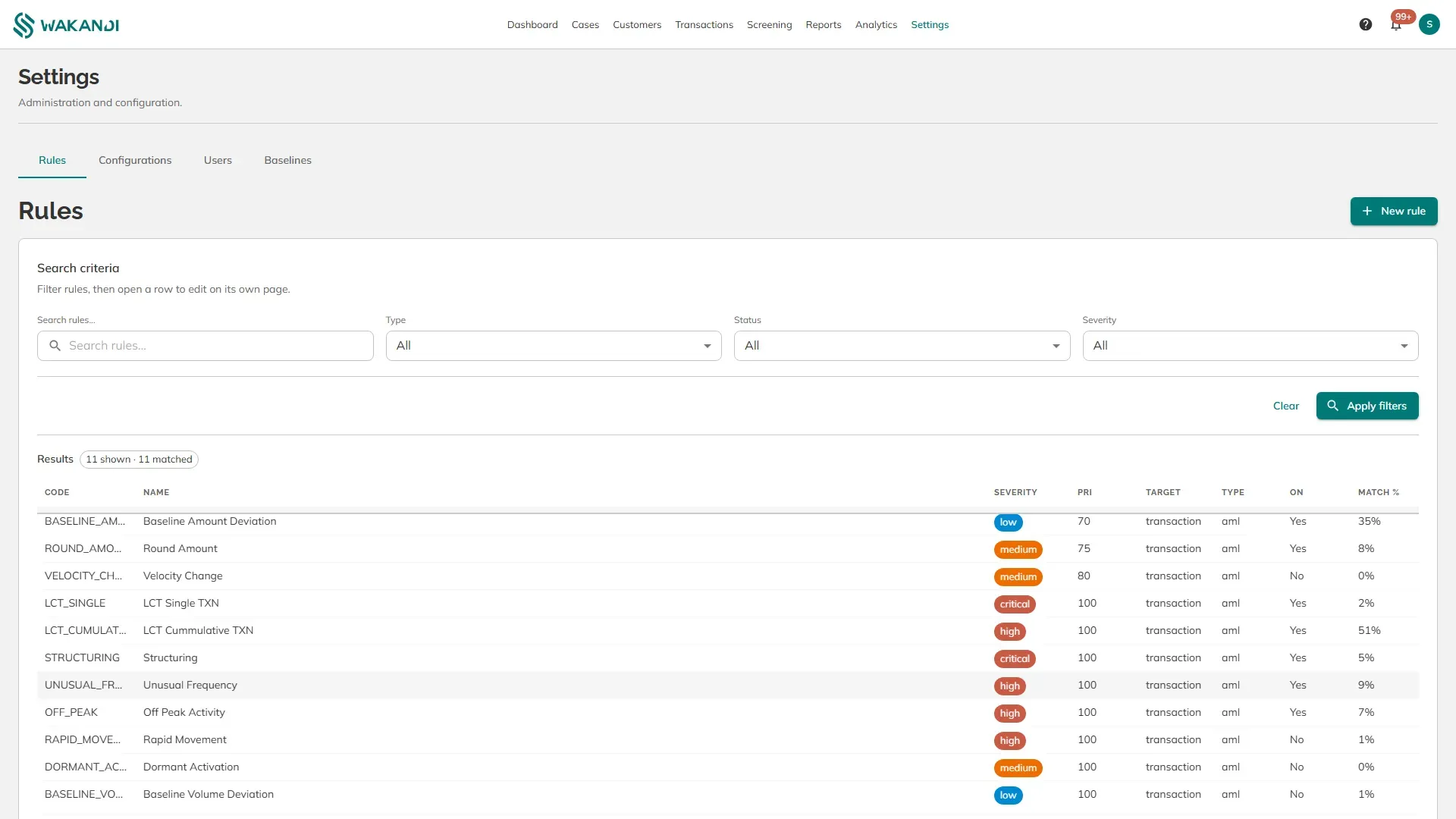
Figure 1: Settings, Rules, listing all eleven rules with severity, priority, whether they are on, and match rate
The eleven rules:
Large cash transactions
- LCT Single (critical) — one cash transaction on its own above your reporting threshold.
- LCT Cummulative (high) — cash transactions that add up past the threshold across a day.
Splitting and layering
- Structuring (critical) — a larger sum broken into several smaller transactions to stay under a limit.
- Rapid Movement (high) — money arriving and leaving again quickly, the account used as a pipe.
Against the member's own normal
- Baseline Amount Deviation (low) — amounts well above what this member usually moves.
- Baseline Volume Deviation (low) — more money in total than this member usually moves.
- Unusual Frequency (high) — more transactions today than the member's average daily count, multiplied by your set figure.
- Velocity Change (medium) — the pace of a member's activity changing sharply.
Shape and timing
- Round Amount (medium) — clean round figures repeated, rather than the uneven amounts real business produces.
- Off Peak Activity (high) — transactions outside the member's usual active hours.
- Dormant Activation (medium) — a long-quiet account suddenly transacting.
Severity sets how urgent a case looks. Priority decides which rule is evaluated first. On shows whether the rule runs at all, so a rule reading No raises nothing.
Note: The eleven are built in. An administrator can add a custom rule with its own conditions.
Common pitfalls & FAQ
- One rule matches far more than the rest. Its threshold probably sits below normal member behaviour. Review the value, not the members.
- A rule shows 0%. Either it is switched off, or nothing has matched it yet. Check the On column first.
- "LCT Cummulative" is spelled oddly. That is the label as it appears on screen. It means cumulative.
- Which rules should be on? A policy decision for your compliance officer, not a default. Agree it before switching anything.